
Discover Why Millions Choose KatFile for Security, Speed, and Simplicity
Cloud storage shouldn’t require a computer science degree. KatFile delivers military-grade security, lightning-fast speeds, and grandmother-approved simplicity. Whether you’re protecting family photos or managing business files, these features make your digital life effortless.
So Easy, Your Grandma Could Use It
Drag, Drop, Done Uploads
No confusing menus. No complicated settings. Just grab files—photos, videos, documents—and drag them into your KatFile window. It works exactly like dropping clothes into a drawer.
Works perfectly on phones, tablets, and computers. iPhone, Android, Windows, Mac—the experience stays identical everywhere. Upload during your commute, at your desk, or from your couch.
“I uploaded my vacation videos during my commute—no manual needed!” — Real user
Your Files, At a Glance
Forget digging through endless nested folders. KatFile displays everything in a clean, photo-album layout. Folders appear as visual tiles with preview images. Tap to open. Scroll to browse. Find anything in seconds.
The interface shows file thumbnails, names, sizes, and upload dates. Sort by newest, oldest, largest, or alphabetically. Search by filename to jump straight to what you need.
One-Click Actions
Hover over any file and friendly buttons appear instantly:
- Share: Copy link to paste in messages or emails
- Download: Save to your device
- Delete: Remove files you don’t need
- Move: Organize into different folders
- Rename: Change filenames without re-uploading
No hidden settings. No confusing right-click menus. Everything you need sits right in front of you.
Speaks Your Language
Switch between 15 languages with one click—English, Spanish, Arabic, French, German, Japanese, Russian, and more. The entire interface translates instantly. No tech dictionary required.
Perfect for international teams, multilingual families, or anyone more comfortable in their native language.
No Manuals Required
If you can use email, online shopping, or social media, you already know how to use KatFile. The learning curve is zero.
Real user feedback: “My 68-year-old dad figured it out in five minutes!” — Jenny, teacher
Uploading Files: Faster Than Sending a Text
Multiple Upload Methods
Drag & Drop
Grab files from your computer folders and drop them into the KatFile window. Upload one file or hundreds simultaneously. The system handles it all.
Browse and Select
Click the “Browse” button to open your file explorer. Select files just like attaching email attachments. Works great on mobile devices.
Bulk Uploads
Select entire folders to upload everything inside at once. Maintains your folder structure automatically. Perfect for organizing photo albums or project files.
Lightning-Fast Upload Speeds
Free Account: 1GB uploads in about 5 minutes—time for a quick coffee break.
Premium Account: 1GB uploads in 20 seconds—faster than microwaving popcorn!
“I uploaded 200 wedding photos during my coffee break!” — Sarah, bride
Upload Progress Tracking
Watch a clear progress bar fill as files upload. See exactly how much time remains. The system auto-saves progress, so refreshing the page won’t lose your work.
Uploads continue in the background. Keep browsing other tabs or working on different files while large uploads finish.
Massive File Support
Works with 100+ file types:
- Documents: PDF, Word, Excel, PowerPoint, text files
- Images: JPG, PNG, GIF, RAW photo formats
- Videos: MP4, AVI, MOV, 4K video files
- Audio: MP3, WAV, FLAC, podcasts
- Archives: ZIP, RAR, 7Z compressed files
- Software: Installation files, apps, programs
File Size Limits:
- Free: Up to 1GB per file
- Premium: Up to 20GB per file
- Premium Pro: Up to 50GB per file
Downloading Files: Instant Gratification
Simple Download Process
Someone sends you a KatFile link. Click it. You see a clean page showing the filename, size, and a big green “Download” button. Click that button.
Free users: Wait 30 seconds (like a microwave countdown). The download starts automatically.
Premium users: Downloads start instantly. Zero wait. No countdown. Just click and go.
Blazing Download Speeds
Free Account: 100 KB/s download speed
- Example: 1-hour movie (1GB) = 3 hours download time
Premium Account: Full internet speed up to 1,000 MB/s
- Example: Same 1-hour movie = 2 minutes download time
Premium Pro: Priority bandwidth for even faster transfers during peak hours
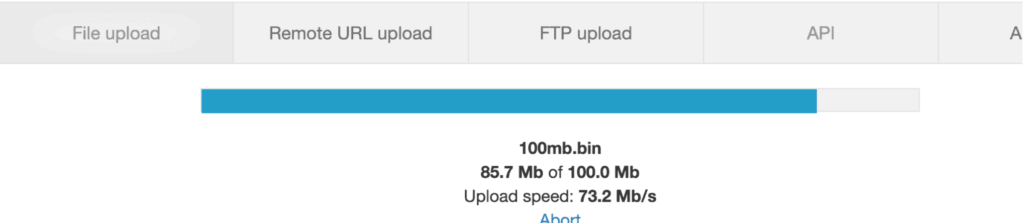
The difference is dramatic. Free users can watch progress bars crawl. Premium users barely see the progress bar before files finish.
Pause and Resume Downloads
Internet connection dropped? Laptop battery died? Accidentally closed your browser?
Premium members can restart downloads exactly where they stopped. No starting over from zero. No lost progress. Just resume and finish.
Perfect for massive files, unstable connections, or downloading on-the-go.
Download Multiple Files
Download several files simultaneously. Free users can download multiple small files. Premium users can download multiple large files at full speed without limits.
Batch download entire folders with one click. Gets packaged into a convenient ZIP file automatically.
Where Downloads Go
Files automatically save to your designated download folder:
Windows: C:/Users/YourName/Downloads
Mac: Click Finder → “Downloads” in sidebar
Phones: Check your “Files” app or “Downloads” folder
Change the default location in your browser settings if you prefer saving elsewhere.
Security Features: Fort Knox for Your Files
Military-Grade Encryption
Every file gets protected with AES-256 encryption—the same standard used by governments, banks, and military organizations worldwide. This encryption is mathematically unbreakable with current technology.
Your files get scrambled during transfers and while stored. Even if someone intercepted them, they’d see only meaningless gibberish. Only you can unlock and access your files.
TRUSTe Certification
KatFile holds TRUSTe certification from a top privacy watchdog organization. This independent verification proves KatFile follows strict privacy and security standards.
Your data isn’t sold to advertisers. Your files aren’t scanned for marketing. Your information stays completely private.
Double-Backup System
Files are automatically saved in two separate data center locations. If one server experiences problems from storms, power outages, or hardware failures, your backup remains safe elsewhere.
Think of it like storing house keys at your neighbor’s. If you lose your copy, the backup saves you.
This redundancy ensures your files stay accessible 99.9% of the time. Data loss becomes virtually impossible.
Automatic Virus Scanning
Every file you download gets automatically scanned for malware, viruses, and trojans. Infected files get blocked before reaching your device.
Premium Pro includes advanced real-time scanning with updated threat databases. It’s like having a security bouncer checking IDs before anyone enters your digital space.
Upload virus scanning also checks files you upload, protecting you and everyone who downloads from you.
Anonymous Downloads (Premium Pro)
Premium Pro members can download files completely anonymously. The system hides your:
- IP address
- Geographic location
- Browsing history
- Download activity
Perfect for journalists protecting sources, activists maintaining privacy, or anyone who values digital anonymity. Your downloads leave no traceable footprint.
Private File Storage
Files stay completely private unless you actively share a download link. Nobody can browse your files. No search engines index your content. Only people with your exact link can access specific files.
Delete any file instantly and permanently. Once deleted, files become completely unrecoverable—even by KatFile staff.
Secure Password Protection
Protect your account with strong password requirements. Enable two-factor authentication for extra security. Optional password-protected file sharing coming soon.
Account login activity logs let you monitor access attempts. See which devices logged in and when.
Organization Features: Everything in Its Place
Folder System
Create unlimited folders and subfolders. Organize by:
- Project names (Work, Personal, School)
- Date ranges (Vacation 2024, Baby Photos 2023)
- File types (Documents, Videos, Music)
- Any custom system that makes sense to you
Drag files between folders effortlessly. Move multiple files at once. Rename folders anytime.
Visual Thumbnails
See preview thumbnails for:
- Photos (full preview images)
- Videos (thumbnail from first frame)
- PDFs (first page preview)
- Documents (icon indicating file type)
Recognize files at a glance without reading filenames. Perfect for visual thinkers.
Search Functionality
Type any filename, keyword, or phrase into the search box. Results appear instantly. Search works across all folders simultaneously.
Filter results by:
- File type (images, videos, documents)
- Upload date range
- File size
- Folder location
Sorting Options
Arrange files by:
- Date: Newest or oldest first
- Name: Alphabetical order
- Size: Largest or smallest first
- Type: Group by file format
Switch between list view (detailed information) or grid view (visual thumbnails) with one click.
File Information
Click any file to see detailed information:
- Original filename
- File size
- Upload date and time
- Number of downloads
- Last accessed date
- Download link
Sharing Features: Collaboration Made Simple
Instant Link Sharing
Hover over any file and click “Share.” A unique download link copies to your clipboard automatically. Paste this link anywhere:
- Text messages
- Emails
- Social media posts
- Slack channels
- WhatsApp conversations
- Any website or platform
Recipients click the link and download immediately. No account required. No sign-up hassles.
Share Entire Folders
Select any folder and click “Share” to generate a link for everything inside. Recipients see all files in the folder without downloading your entire collection.
Perfect for:
- Photo albums (share 100 vacation photos at once)
- Project files (send all work documents to clients)
- Music collections (share playlists with friends)
Download Tracking
See how many times each file has been downloaded. Monitor which files are most popular. Great for content creators tracking engagement.
Premium Pro users get detailed analytics:
- Download dates and times
- Geographic locations of downloaders
- Bandwidth used
No File Size Email Limits
Email providers limit attachments to 25MB or less. KatFile lets you share files up to 20GB (Premium) or 50GB (Premium Pro).
Send massive video files, high-resolution photo collections, software installers, or complete project archives without frustration.
Professional Sharing
Premium accounts remove all ads from download pages. Your clients, customers, or colleagues see a clean, professional experience when downloading your files.
Maintain your brand image without distracting advertisements.
Cross-Platform Access: Works Everywhere
Web Browser Access
Works perfectly in all modern browsers:
- Chrome
- Firefox
- Safari
- Edge
- Opera
No software installation required. Just visit KatFile.com from any device with internet access.
Mobile Optimized
The interface automatically adapts to smaller screens on phones and tablets. All features work identically:
- iPhone/iPad: Full iOS compatibility
- Android: All Android versions supported
- Tablets: Optimized for both portrait and landscape
Upload photos directly from your phone’s camera roll. Download files to your mobile device. Manage your entire file collection from your pocket.
Desktop Experience
Full-featured experience on:
- Windows: All versions from Windows 7 onward
- Mac: macOS compatibility
- Linux: Works in all Linux browsers
The interface scales beautifully to large desktop screens. Manage hundreds of files easily with plenty of screen real estate.
Sync Across Devices
Upload from your laptop at work. Download to your phone on the commute home. Access the same files from your tablet on the couch.
Changes sync automatically. Delete a file on your phone and it disappears from all devices instantly.
Additional Premium Features
No CAPTCHA Requirements
Free users solve CAPTCHA puzzles before downloads (those annoying “select all traffic lights” tests). Premium members skip CAPTCHAs entirely.
Save time and frustration with every download.
Extended File Storage
Files automatically delete after inactivity periods:
- Free: 30 days
- Premium: 60 days
- Premium Pro: 1 year
Download or share any file to reset its activity timer. Active files never expire.
Priority Customer Support
Premium Pro members get priority email support:
- 24-hour maximum response time
- Jump the support queue
- Dedicated support agents
- Phone support available
Free and Premium users get standard support (usually under 48 hours).
No Advertisements
Premium and Premium Pro accounts enjoy completely ad-free experiences:
- No banner ads during uploads
- No pop-up ads during downloads
- Clean interface without distractions
- Professional appearance for shared files
Content Creator Features
Earn Money from Downloads
Upload valuable content (templates, guides, recipes, resources) and earn 5–5–20 per 1,000 downloads. Get paid weekly via PayPal.
Turn your knowledge into passive income. Share helpful resources and get rewarded.
Analytics Dashboard (Premium Pro)
Track detailed statistics:
- Total downloads per file
- Geographic distribution of downloaders
- Peak download times
- Earnings reports
- Bandwidth usage
Optimize your content strategy based on real data.
Unlimited Bandwidth
Premium accounts have no bandwidth limits. Share files with thousands of people without restrictions or extra charges.
Perfect for viral content, popular resources, or high-traffic sharing.
Why KatFile Beats the Competition
vs. Dropbox: No file size limits for uploads (Dropbox limits free users to small files)
vs. Google Drive: Never scans your files for advertising data
vs. OneDrive: Faster download speeds and better privacy
vs. WeTransfer: Files don’t expire after 7 days
vs. USB Drives: Never lose or break your storage device
vs. Email Attachments: Share files up to 1,000x larger
Real User Success Stories
“I run an architecture firm. We send 3D building models to clients instantly. Premium Pro’s 50GB file limit is perfect.” — Ricardo, architect
“My band shares song demos with our producer. The audio quality stays perfect—no compression!” — Amy, musician
“I backup my drone footage. 4K videos upload so fast I barely wait.” — Tom, photographer
“Shared Grandma’s recipe collection with my cousins in one click. Everyone got the whole folder!” — Jessica, home cook
Start Experiencing These Features Today
Every feature described here exists to make your digital life simpler, safer, and faster. No feature requires technical knowledge. Everything works intuitively.
Try free to test the basics. Upgrade to Premium when you’re ready for full speed and premium features. Jump to Premium Pro when you need ultimate power and unlimited storage.
Your files deserve better. KatFile delivers.